

Back to Page
Amazon Seller Account
How to open an Amazon Seller Account in Australia
TL;DR
Amazon Australia has a growing market with millions of potential customers.
You can open an Amazon Seller account by providing the necessary documents, business details, and choosing the right plan.
Two selling plans: Individual plan (for low-volume sellers) and professional plan (for larger businesses).
Choose between Fulfillment by Amazon (FBA) and Fulfillment by Merchant (FBM) based on your business needs.
Optimize product listings with clear titles, good images, and relevant keywords.
Use Amazon's advertising and customer service tools to improve sales and customer satisfaction.
Starting an Amazon seller account in Australia is a great way to grow your business and reach millions of customers. But setting it up the right way is important for success.
In this guide, we’ll show you everything you need to do. From picking the right selling plan and gathering the necessary documents to listing your products and choosing how to ship them. We’ll also help you avoid common mistakes and give you tips to make your Amazon store successful.
Whether you’re new to selling or looking to grow, understanding Amazon’s rules, choosing the best products, and using the right tools are key to success. With the right steps, you can start selling on Amazon and reach customers all over the world.
Why Sell on Amazon Australia?
Amazon Australia is growing fast, with over 11 million people shopping on the platform every month. This allows sellers to reach a wide audience and sell products through a trusted marketplace. Many Australian customers prefer Amazon for its quick delivery and easy returns, with 89% of shoppers saying they trust the platform’s fulfillment process.
You can also take advantage of Fulfillment by Amazon (FBA), where Amazon handles storage, packaging, and shipping, allowing you to focus on growing your business instead of dealing with logistics and boost Amazon sales.
Compared to traditional retail, selling on Amazon requires little upfront investment, making it ideal for small business owners and individuals looking to start an online business. Amazon continues to expand, adding new product categories and better support for sellers, creating even more opportunities.
Additionally, sellers in Australia can use Amazon Global Selling to reach international markets like the U.S., UK, and Canada, increasing their potential customer base significantly.
Requirements for opening an Amazon Seller Account in Australia
Government-issued ID (passport or driver’s license).
ABN (Australian Business Number) for tax and business verification.
Tax information (Australian tax number if applicable).
Australian bank account for receiving payments.
Credit card for registration and Amazon fees.
Who Can Open an account?
Amazon allows individuals and businesses, including:
Sole traders
Companies (Pty Ltd)
Registered businesses with an ABN (Australian Business Number)
How to open an Amazon Seller Account in Australia
#1 Sign up on Amazon Seller Central
To start selling on Amazon Australia, visit Amazon Seller Central Australia and click “sign up.” You need to enter your email address and create a password. After logging in, you must choose a selling plan and provide basic details like your business name, tax information, and contact details.
#2 Choose your selling plan
Amazon offers two selling plans.
Individual Plan, costing $0.99 per item sold, is best if you plan to sell fewer than 40 items per month.
Professional Plan, at $49.95 per month, is ideal if you want access to bulk listing tools, advertising options, and detailed analytics.
You can start with an individual plan and switch to the professional plan as your business grows.
#3 Submit required documents for verification
Amazon requires identity verification to ensure a secure marketplace.
You must upload a passport or driver’s license for ID verification and provide a utility bill or bank statement as proof of address.
If registering as a business, an ABN certificate may be needed. In some cases, Amazon may request a video call verification to confirm your identity.
#4 Set up your bank account for payments
You must link a valid Australian bank account to receive payments from Amazon. It is recommended to use a business bank account to keep finances separate.
Additionally, you need to set up a payment method for Amazon fees, such as subscription charges and fulfillment costs.
#5 Review and accept Amazon’s terms & conditions
Before completing registration, you must read and accept Amazon’s Seller Agreement, which explains marketplace policies, compliance rules, and seller responsibilities.
Understanding these terms helps you maintain a good account standing and avoid penalties.
#6 Identity verification
Once all details and documents are submitted, Amazon will review your application. The verification process usually takes a few business days. You may need to submit additional documents if requested.
In some cases, you may be required to complete a video verification call with an Amazon representative.
Once verified, you can start listing and selling products on Amazon Australia.
Understanding your Seller Central dashboard
Once you set up your Amazon seller account, the Seller Central dashboard becomes your main tool for managing your business. It helps you track inventory, process orders, and communicate with customers. Learning how to use it well will make selling easier and improve your success.
Key Features:
Inventory management: Add, update, and monitor your product listings. Keep stock levels accurate and adjust pricing as needed. You can also opt for the Amazon Seller account management that ensures your stock management.
Order management: View and handle customer orders, track shipments, and manage returns. If using FBA, Amazon takes care of shipping and returns for you.
Performance metrics: Check customer reviews, return rates, and order accuracy to maintain a good seller rating.
Reports & analytics: Access sales reports and ad performance insights to grow your business.
Important Settings Before Listing:
Shipping: Choose between FBA (Amazon fulfills orders) or FBM (you handle shipping).
Taxes: Set up a GST collection based on your business location.
Returns: Define return policies that follow Amazon’s rules.
Advertising: Use Amazon PPC to promote your products and increase visibility.
A well-organized Seller Central dashboard makes running your Amazon business smooth and successful.
Selecting the right products to sell on Amazon Australia
Market Research: Use tools like Helium 10 and Jungle Scout to analyze market trends, demand, and competition. Focus on low-competition, high-demand products with stable sales throughout the year. Check customer reviews of existing products to identify gaps and improvements.
Check Amazon’s Policies: Ensure your product complies with Amazon’s guidelines to avoid listing removal or account suspension. Some categories, like electronics, health, and beauty, may require special approval. Regularly review Amazon’s updated policies to stay compliant.
Sourcing Products:
Wholesale: Buy in bulk at lower costs and resell for profit.
Private Label: Customize existing products with your own branding and packaging.
Dropshipping: Sell products without holding inventory—suppliers ship directly to customers.
Handmade: Sell unique, handcrafted goods through Amazon Handmade.
Creating your Amazon product listing
A good Amazon product listing helps customers find your product and boosts sales. Here’s how to create one:
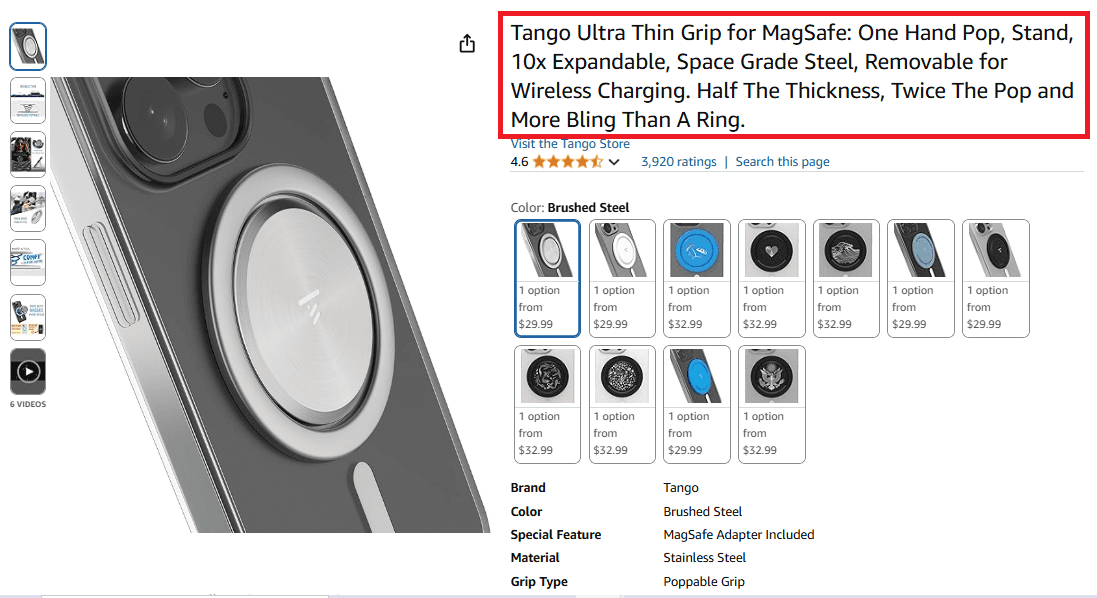
Product title:
Keep it clear, short, and keyword-rich.
Include brand name, product type, key features, and size/color if needed.
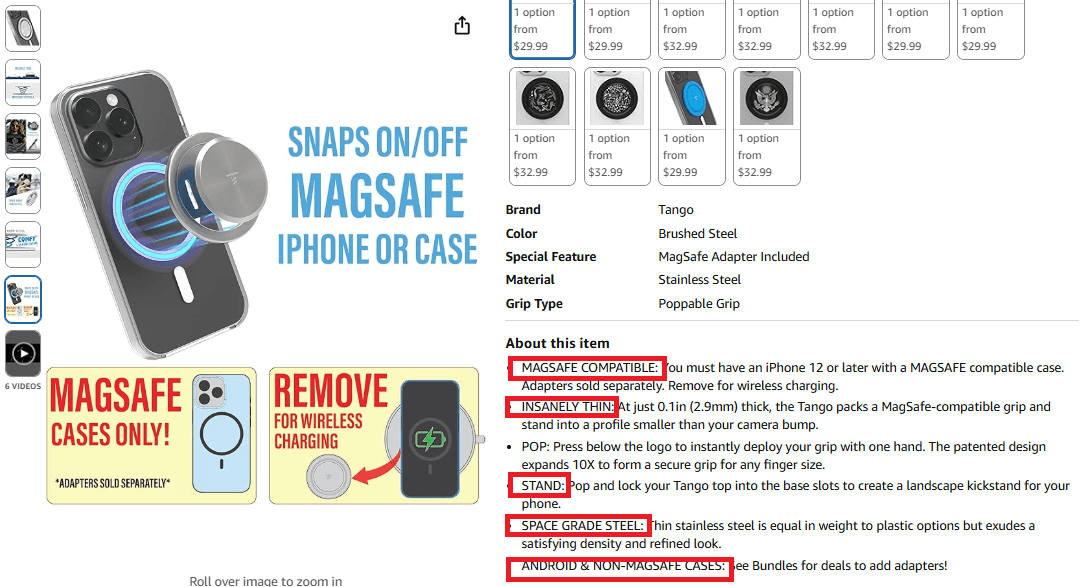
Bullet points:
List five key features and benefits in short, simple sentences.
Focus on quality, durability, ease of use, and unique features.
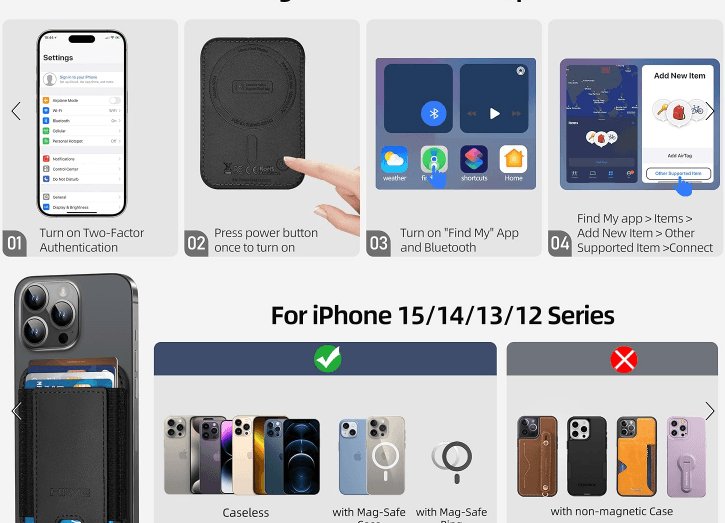
Description:
Explain how your product helps customers in a clear and friendly way.
Highlight its benefits and why it’s better than competitors.
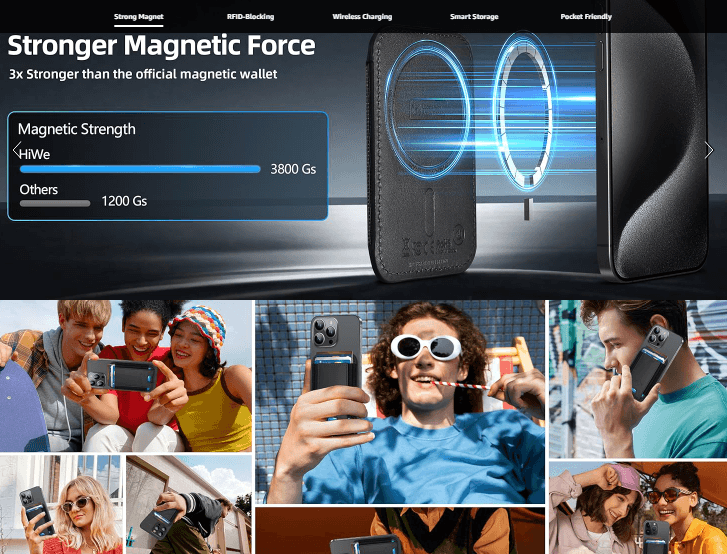
Images:
Use high-quality photos from different angles.
Add lifestyle images to show the product in use.
Follow Amazon’s image size and background rules.
Keywords:
Add relevant search terms to improve visibility.
Use keywords in the title, bullet points, and backend search terms.
A well-optimized Amazon listing makes your product easier to find and more appealing to buyers, helping you sell more on Amazon.
Choosing how to fulfill your orders is important for managing your Amazon business. Below is a simple comparison of Fulfillment by Amazon (FBA) and Fulfillment by Merchant (FBM) to help you decide.
Fulfillment Method | Fulfillment by Amazon (FBA) | Fulfillment by Merchant (FBM) |
How it works | Amazon stores, packs, and ships your products. | You store, pack, and ship products yourself. |
Shipping & delivery | Faster shipping with Prime eligibility. | Standard shipping without Prime benefits. |
Customer service | Amazon handles returns and customer support. | You handle returns and customer service yourself. |
Pros | Less work for you, faster shipping, increased sales potential. | Lower costs, more control over packaging and shipping. |
Cons | Amazon charges storage and fulfillment fees. | More manual work, slower shipping, no Prime benefits. |
Which One Should You Choose?
FBA is best if you want fast shipping, Prime benefits, and less work on logistics.
FBM is better if you want lower costs, more control, and don’t mind handling shipping.
Pick the option that fits your budget, business size, and how much control you want over shipping and customer service.
Managing your Amazon store and growing your business
To succeed on Amazon, you need to track performance, run good ads, and provide great customer service. Here’s how:
Tracking Performance
Use Amazon Seller Central to check sales, inventory, and customer feedback.
Keep your Account Health score high to avoid issues with Amazon.
Track orders, returns, and refunds to improve your service.
Advertising on Amazon
Use Sponsored Products and sponsored brands to get more customers.
Improve PPC (pay-per-click) ads by using the right keywords and adjusting your budget.
Remove low-performing keywords to save money and get better results.
Providing great customer service
Reply quickly to customer questions to build trust.
Handle returns and refunds in a professional way.
Ask customers for reviews, as positive ratings help increase sales.
By focusing on these areas, you can grow your Amazon business, increase sales, and build a strong brand. A well-managed store keeps customers happy and improves your success.
Final thoughts
Starting your Amazon seller account in Australia is the first step toward building a successful business. After setting up your account, the next key steps include choosing the right products, creating great listings, and picking the best fulfillment method. Amazon offers useful tools like FBA and advertising features to help you grow, but knowing how to use them well is important.
With all the details to manage, from taxes and fees to creating strong listings and handling inventory, it can be a lot to handle. That’s where we come in. Our Amazon consulting services are here to help, whether you’re just starting or looking to grow your business. We can help you optimize your listings, manage your inventory, and improve your ads to boost sales.
Let’s work together to make your Amazon business a success!


